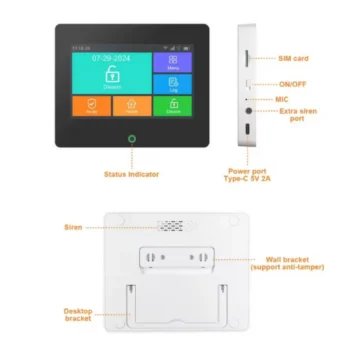
Smart Kit with Wi-Fi Siren, Various Sensors and Remote Control
433MHz Wireless Intelligent Security Kit: Intelligent security system designed for home, office or small commercial premises protection. The system combines the function of gateway and siren in a single device and is fully controlled through the Tuya Smart / Smart Life application,…
- Control and management via Tuya Smart / Smart Life app
- Integrated 120dB siren with warning light
- Three operating modes: Home Arm, Away Arm and Disarm
- Alarm, power outage and low battery notifications
- Internal rechargeable battery for backup operation
- Possibility to add up to 24 wireless accessories and 8 remote controls
- Wireless communication distance up to 100 meters in open space
- Individual naming and management for each sensor
- Scheduling automatic activation and deactivation schedules
- Compatibility with Google Home and Amazon Alexa
- Integration with other Tuya devices such as cameras and smart plugs
Smart Kit with Wi-Fi Siren and Remote Control Sensor
433MHz Wireless Intelligent Security Kit:Intelligent security system designed for home, office or small commercial premises protection. The system combines the function of a gateway and siren in a single device and is fully controlled through the Tuya Smart / Smart Life application, providing real-time monitoring and notifications.
Secure System:Thanks to WiFi connectivity and 433MHz wireless communication with sensors, the system provides rapid response in case of alarm, high-volume sound signal, and automation options with other Tuya devices.
Battery:The internal battery allows operation even in the event of a power outage. Backup lithium battery 4.2V 300mAh. Full charging time is about 5 hours.
Installation:
1. Downloading and Registering the Application
- Download the Smart Life or Tuya Smart app from Google Play or the App Store.
- Open the app and register with email
- Log in to the application after registration.
2. Connecting the Siren to WiFi Attention: The system only works with 2.4GHz WiFi
Method 1 – Default Mode
- Open the app and press “+” to add devices.
- Select All Devices → Alarm System
- Make sure the siren light is flashing quickly.
- Enter the WiFi password and confirm.
- The device automatically connects to the network.
Method 2 AP Mode (Compatibility Mode)
- Used if connection with the first method fails
- In the application, select AP Mode
- Turn the siren off and on.
- Hold down the RESET button for 5 seconds.
- The light will flash slowly.
- Enter the WiFi password (2.4GHz)
- Connect to the SmartLife-XXX network from your phone's WiFi
- Return to the app to complete the connection Important WiFi notes
- Does not support 5G networks
- Keep the siren and phone close to the router.
- If that fails, restart the router.
3. Adding Sensors and Remotes
Method 1 – Through the Application
- Open the device in the app
- Select Accessories → Detector / Remote → Add
- Press OK.
- Activate the sensor:
- Door sensor: move the magnets more than 2 cm away
- PIR sensor: turn on the sensor
- The siren light flashes 3 times, the addition is successful.
Method 2 – Through Siren
- Press the RESET button on the siren.
- The light stays on.
- Activate the sensor or remote control
- The light flashes 3 times the device was added successfully
- Repeat for other devices
4. Naming Accessories
- You can change the name of each sensor in the app.
- The name can be up to 24 characters long.
- Helps identify the alarm zone
5. Siren Installation
- Remove the holder by sliding it off.
- Fix the holder to the wall with screws.
- Place the mermaid's body on the stand.
- Rotate until fully seated.
6. Installing the Door Sensor
- The distance between the magnet and the sensor must be less than 10 mm.
- When the door opens and the light turns on, the installation is correct.
- If the light flashes during activation, the battery is weak and needs to be replaced.
7. Usage and Maintenance Tips
- Test the system every 3 months
- Check sensor batteries every month.
- Do not place multiple PIR sensors in the same area.
- Avoid installing the PIR sensor in front of windows or heat sources.
- SKU
- A3423
- Weight
- 0.1 kg