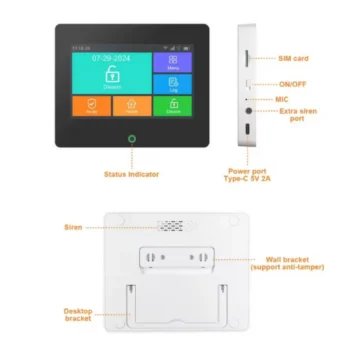
Security Alarm Kit with SIM Card Tuya
4G Alarm System: Works via SIM card (mobile network) and does not require a WiFi router, making it ideal for homes, shops, offices, warehouses or environments where there is no fixed internet. Control System: The system is fully controlled by the Tuya Smart application and is compatible…
- Control via app (4G Cellular Data)
- Does not require WiFi
- Arm/Disarm with app, remote control or SOS
- Delayed alarm, immediate alarm and scheduled alarm
- Intelligent connection with other devices
- Device low battery notification
- Supports up to 50 wireless sensors and 8 remote controls
- Supports up to 6 phone numbers and 6 SMS numbers for alarm
- Designation of protection zones
- Zone modalities: immediate, delayed, 24 hours, doorbell, senior zone, bypass
- Internal rechargeable battery with ON/OFF notification
- Supports 9 different languages
Tuya Sim Card Security Alarm Kit
4G Alarm System:It works via a SIM card (cellular network) and does not require a WiFi router, making it ideal for homes, shops, offices, warehouses or environments where there is no fixed internet.
Control System:The system is fully controlled by the Tuya Smart application and is compatible with Amazon Alexa and Google Assistant. In the event of an alarm, the system sends notifications to the application, calls and SMS according to your configuration.
The packaging includes:
- 1x Alarm system center
- 1x PIR motion sensor (wireless)
- 1x Door/window sensor (wireless)
- 2x Remote control
- 1x Siren
- 1x Power supply
- 1x User manual
Alarm Center Installation:
- Place it in the center of the area where the sensors are.
- Keep away from large metal objects, fire doors and electrical appliances.
- Place in a place with good mobile signal
App Configuration (Tuya Smart):
- Insert a Micro SIM with active internet.
- The device must be powered off during SIM insertion.
- Download the Tuya Smart app (Android/iOS)
- Press and hold RESET for 3 seconds until you hear the “Di” sound and the LED flashes.
- Open the app → “Add Device” → scan the QR Code on the back of the device
- Wait for successful connection.
Working Modalities:
- Away Mode (Armed): When no one is home
- Home Mode: When you are at home, only external sensors are active
- Disarmed Mode: Alarm deactivated
- SOS: Emergency sends alarm, calls and SMS
LED indicator:
- Steady blue light: Armed
- Blue light flashing every 6 seconds: Disarmed
- Blue light every 2 seconds: Home Mode
- Flashing red light: Alarm active
Sensor Installation: Door/Window Sensor:
- Distance between magnet and sensor: <10mm
- LED lights up when door is opened: correct installation
- LED flashes: low battery
PIR Motion Sensor:
- Do not direct it towards windows or heat sources.
- Do not place it in front of vibrating objects.
- Detection distance: up to 8m
- Transmission distance: up to 80m
Maintenance and Safety:
- Check the center every 3 months
- Test the sensors every month.
- Do not disassemble or modify the device.
- Do not post official emergency numbers without authorization.
- SKU
- A3424
- Weight
- 0.1 kg