
Security Alarm Kit with Wi-Fi and 4G Tuya
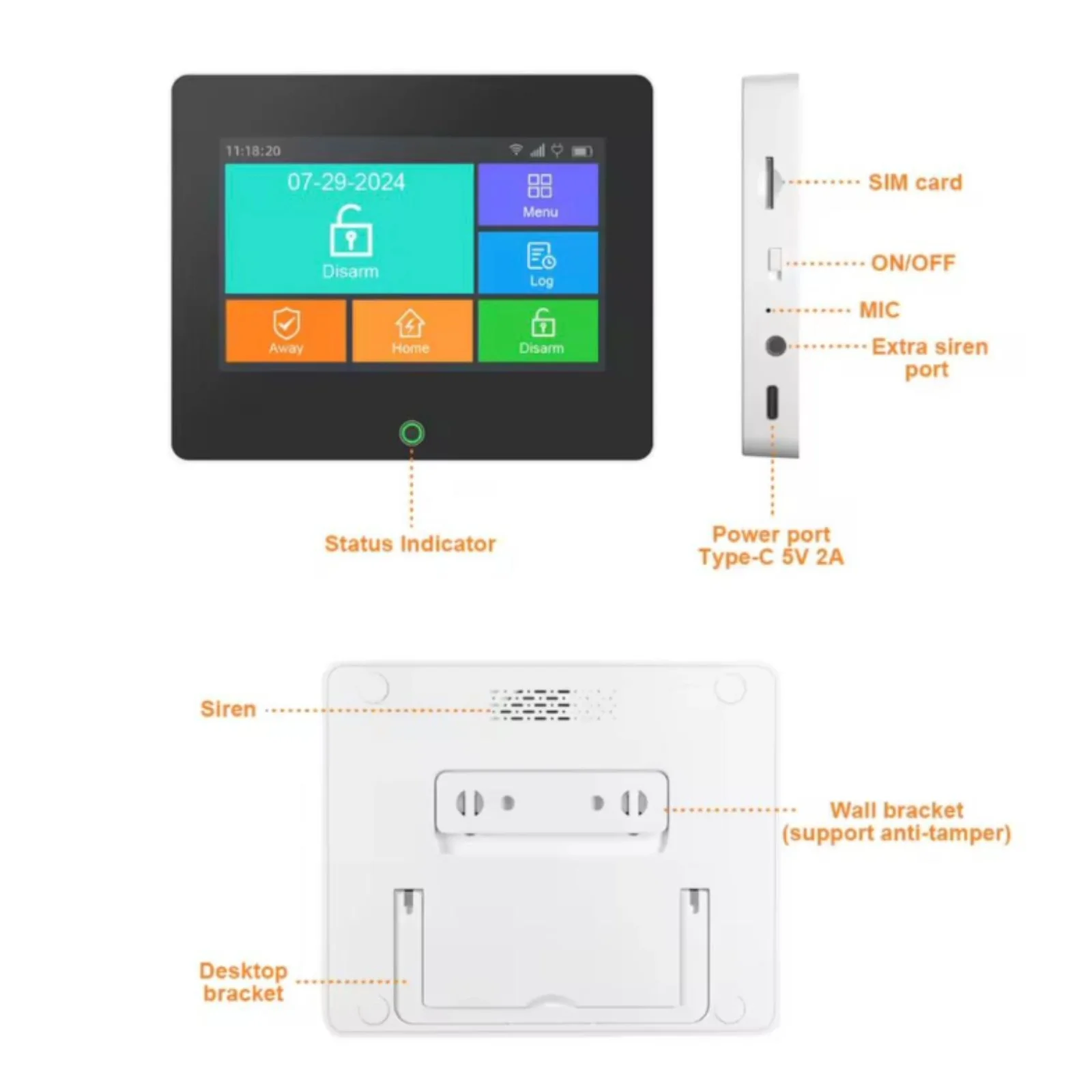
Tyla Touch Screen Alarm System: Intelligent security system for homes and businesses, remotely controllable through the Tuya Smart / Smart Life application. The device combines WiFi and GSM (2G) connectivity to guarantee continuous operation even in the event of an internet outage.
- Security Alarm Kit with Wi-Fi and 4G
- Control from the Tuya Smart / Smart Life app
- TFT LCD touch screen
- Supports WiFi 2.4GHz + GSM (2G SIM)
- Up to 99 wireless devices (sensors & remote controls)
- Wireless frequency: 433MHz
- Internal siren: 90 dB
- Supports: Door/window sensor, motion (PIR), smoke, gas, water, vibration, broken glass, panic button, wireless siren, additional keypad
- Supports 5 phone numbers for calls + 5 SMS numbers
- Notice for: Low battery, AC power outage, WiFi disconnection
- Renaming options for panel and sensors
- Built-in battery: Lithium 3.7V / 1000mAh
- Supply: 5V / 2A (Type-C)
- Factory password: 123456
Security Alarm Kit with Wi-Fi and 4G Tuya
Tyla Touch Screen Alarm System:Intelligent security system for homes and businesses, remotely controllable via the Tuya Smart / Smart Life application. The device combines WiFi and GSM (2G) connectivity to guarantee continuous operation even in the event of an internet outage.
Easy Control:With a TFT touch screen, built-in siren and support for up to 99 wireless sensors, the system offers high security, simple management and instant notifications via calls, SMS and the app.
Packaging Contains:
- 1× Alarm panel (with built-in battery)
- 1× PIR motion sensor
- 1× Door/window sensor
- 1× Remote control
- 1× Power adapter
- 1× User manual
Installation:
1. Panel Setup
- Place the alarm panel in a dry and visible place.
- Connect to power via the Type-C adapter.
- Insert the 2G SIM card without PIN (optional, for GSM).
2. WiFi configuration
- Make sure the WiFi network is 2.4GHz.
- Turn on WiFi and Bluetooth on your phone.
- From the panel: Menu → WiFi → Start
- In the app: Add Device (+) → Alarm System → follow the steps on the screen.
3. Connection to the Application
- Download Tuya Smart / Smart Life
- Register or log in
- Once the connection is successful, the system appears in the application
4. Sensor Installation Door/Window Sensor
- Place the sensor and magnet with a distance of less than 10 mm.
- Test opening/closing for LED signal Motion Sensor (PIR)
- Do not aim at windows, heat sources or moving objects.
- Place at appropriate height for optimal coverage
- Do not install several PIR sensors too close to each other.
5. Testing
- Activate Arm/Home/Disarm mode
- Test the sensor alarm
- Verify calls and SMS (if GSM is active)
- SKU
- A3425
- Weight
- 0.1 kg


